> ## Documentation Index
> Fetch the complete documentation index at: https://docs.crossmint.com/llms.txt
> Use this file to discover all available pages before exploring further.
# Quickstart ⚡
> Launch a store for your digital assets in 5 minutes, without coding
## Quickstart
In addition to the standard requirements, the contract must accept a recipient argument and optionally a quantity argument. The following mint functions signatures are examples:
```
function mint(address _to)
function mint(address _to, uint256 _quantity)
```
For thirdweb drops, you need to set up Claim Conditions from the thirdweb dashboard.
Crossmint supports Candy Machine v3 drops.
3. Open your collection, go to the `Checkout` tab, and enable it.
4. Select the `No-code Storefront` tab and turn on the toggle.
5. Set the `Price per item` to match the price in your smart contract. Ensure it's set in the native currency of the contract and that it includes any ancillary fees.
If your collection is set up using an external platform which charges a fee per digital asset, please add that
amount to the price. For example, if you contract charges `0.01 ETH` and the provider charges `0.002 ETH`, then set
the price at `0.012 ETH`.{" "}
6. Click on `Save`.
7. (Optional) Customize the branding and style of your page, using the console.
### Looking to sell digital assets directly from your website?
Add a button that opens a checkout in a pop-up or new tab.
Embed a checkout into your site for full UX control.
## FAQs
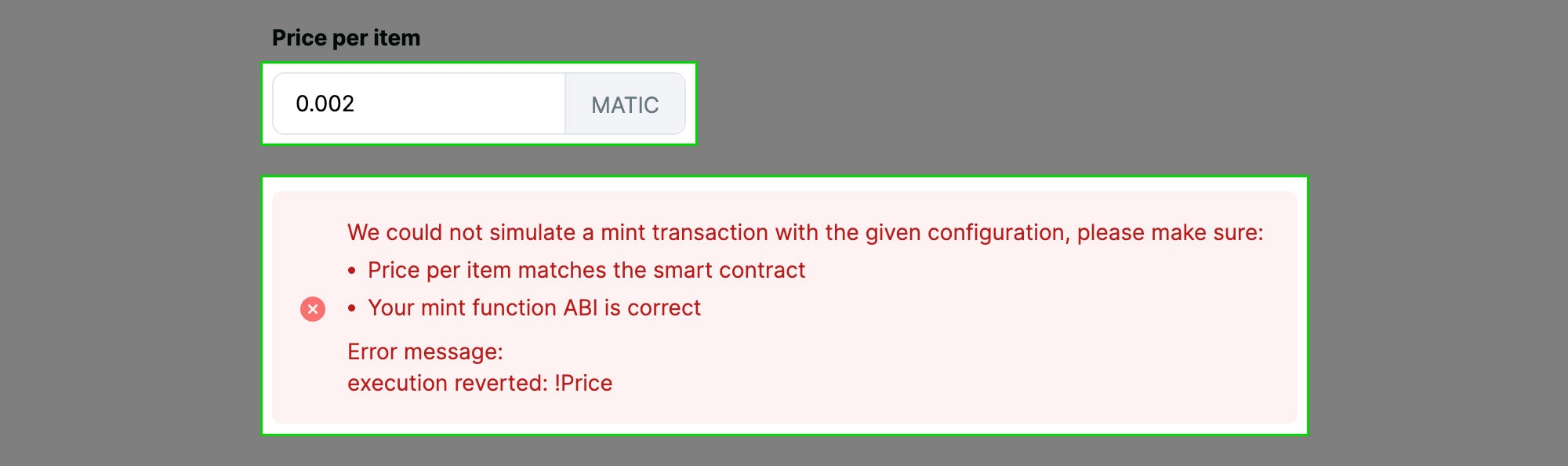
Once your storefront is configured, Crossmint will attempt to simulate a transaction. If there is an error, you will see a message like the following.
Common errors include:
| Problem | Solution |
| ---------------------------------------- | ------------------------------------------------------------------------------------------------------------------------------------------------------------------------------------------------------------------------------------------------------------------------------------------------------------------------------------ |
| **execution reverted: !Price** | The price is incorrect. Make sure you set it up correctly on the console.
If your contract provider charges a mint fee, make sure it's included. For example, if the digital asset costs `0.01 ETH` and the contract provider charges a mint fee of `0.012 ETH`, set the price per item to `0.01 + 0.002 = 0.012 ETH`. |
| **Digital assets not available to mint** | Make sure minting is enabled on the contract and Crossmint has permission to mint. If you are using a Crossmint contract, ensure there are digital assets left. |
The storefront currently supports ERC-721, Metaplex and compressed NFTs. ERC-1155 contracts are not yet supported.
The storefront includes the standard payment methods: fiat (debit and credit cards, Apple and Google Pay), and crypto, including the native currency of the digital asset and cross-chain payments (eg. Pay with ETH for a SOL-based NFT).
 Common errors include:
| Problem | Solution |
| ---------------------------------------- | ------------------------------------------------------------------------------------------------------------------------------------------------------------------------------------------------------------------------------------------------------------------------------------------------------------------------------------ |
| **execution reverted: !Price** | The price is incorrect. Make sure you set it up correctly on the console.
Common errors include:
| Problem | Solution |
| ---------------------------------------- | ------------------------------------------------------------------------------------------------------------------------------------------------------------------------------------------------------------------------------------------------------------------------------------------------------------------------------------ |
| **execution reverted: !Price** | The price is incorrect. Make sure you set it up correctly on the console.