

Your App, Your Brand
- Your sign-in. Your users sign in to your app with your own auth provider. They do not create a Crossmint account.
- Your screens. The card form and the approval are components inside your app. Style them to match your design. See Customize UI.
- Your users’ own cards. Each purchase runs on the user’s own card. Nothing is prefunded, and no new card account is opened, so the user keeps the card’s rewards and protections.
Key Features
Approve once, pay many times
One order intent covers several payments, until its amount is spent. One saved card backs any number of order intents
Limited by design
Each order intent has an amount, a purpose, an expiration, and optionally a merchant
Enforced by the network
Visa Intelligent Commerce and Mastercard Agent Pay hold the limit, not your code
Card number never exposed
Your app, your agent, and the model work only with IDs
Works globally
Any credit or debit card, from any country: network rails when the card has them, the encrypted card for every other card
Revocable
The user cancels an order intent or deletes the saved card at any time
How It Works
1
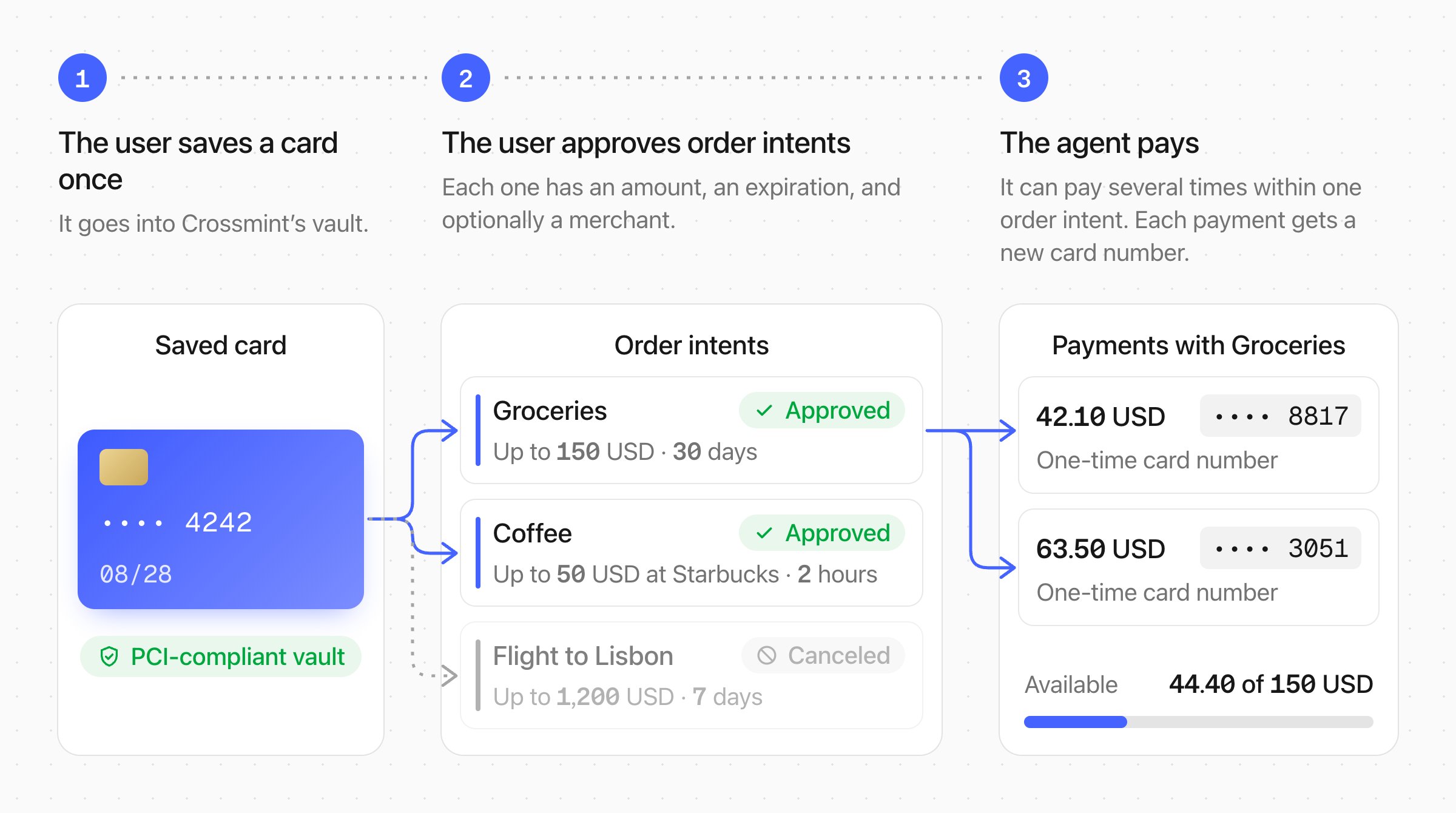
The user saves a card once
Your app shows the Crossmint card form. The card goes directly to Crossmint’s PCI-compliant vault and never touches your servers. Your app gets a
paymentMethodId.2
The user approves an order intent
When your agent must pay, your app creates an order intent with an amount, a description, an expiration, and optionally a merchant. The user approves it with a passkey or a step hosted by the card network, and can cancel it at any time. One order intent can cover several payments, until its amount is spent or it expires. Create one for each purchase, each task, or each agent.
3
The agent pays
With Agent Checkouts, the agent sends only the order intent ID, and the checkout enters the card at the merchant. With your own checkout, the agent gets a one-time card number for the purchase. Each payment takes its amount from the order intent and gets a new credential. See Card Rails and PCI Compliance.
Rails
One order intent can pay on several rails. Visa Intelligent Commerce and Mastercard Agent Pay give a one-time credential, and the card network enforces the limit. Every other card uses the encrypted card. With Agent Checkouts, the encrypted card stays inside the Crossmint vault, and you do not need to enable anything. See Card Rails and PCI Compliance.Get Started
Quickstart
Run the reference app: sign in, save a card, approve an order intent, and get a card number
Try the live demo
See the full flow without setting anything up locally
Guides
Save a Card
Collect a user’s card in a PCI-compliant form
Register a Card
Find the rails that a saved card supports
Approve an Order Intent
Create an order intent and verify its rail
Get a Card Number
Get a credential for your own checkout
Customize UI
Style the approval and the CVC form to match your brand
Cancel Card Access
Cancel an order intent or delete a saved card
API Reference
Payment Methods
Create, list, and delete saved cards
Order Intents
Create, get credentials from, and cancel order intents
FAQs
Do my users get a Crossmint card?
Do my users get a Crossmint card?
No. Your users pay with their own saved card. An order intent is a limit that the user approves on that card. Crossmint does not issue a new card, and your users do not see a Crossmint account.
How is Agent Cards different from Stripe Link?
How is Agent Cards different from Stripe Link?
Both let an agent pay with a user’s card. The differences:
- Your users stay in your app. With Link, the user signs in to Link and approves each payment there. With Agent Cards, the card form and the approval are components in your app, with your sign-in and your design.
- The user’s own card. Link gives the agent a single-use virtual card for each purchase. Agent Cards uses the user’s own card on Visa Intelligent Commerce and Mastercard Agent Pay, and the encrypted card for other cards. The purchase shows on the user’s statement as a purchase from the merchant, the card’s rewards apply, and refunds and chargebacks work as usual.
- Approve once, pay many times. A Link card works once and expires 12 hours after the spend request. An order intent can last days or months and cover several payments, for example for a budget or a price watch.
- Cards from any country. Link cards for agents are available only in the US. Agent Cards works with credit and debit cards from any country.
- A checkout as well as a card. With Link, your code does the checkout and must handle the card number in a PCI-compliant way. With Agent Checkouts, Crossmint does the checkout, and your systems never get the card number.
Do my users need a Crossmint account?
Do my users need a Crossmint account?
No. Your users sign in to your app with your own auth provider, such as Firebase, Auth0, or Stytch. Register the provider in the Crossmint Console. See Bring Your Own Auth.
Does the agent ever see the user's real card number?
Does the agent ever see the user's real card number?
No. With Agent Checkouts, the agent sends only the order intent ID. With your own checkout, the agent gets a one-time card number from the card network. The real card stays in Crossmint’s PCI-compliant vault. The only exception is the encrypted card outside Agent Checkouts, which needs encrypted card access. See Card Rails and PCI Compliance.
Do your users keep their rewards, refunds, and chargeback rights?
Do your users keep their rewards, refunds, and chargeback rights?
Yes. Every purchase runs on the user’s own card, so the card’s normal protections apply. Nothing is prefunded and no new account is opened.
What happens when a card supports neither Visa Intelligent Commerce nor Mastercard Agent Pay?
What happens when a card supports neither Visa Intelligent Commerce nor Mastercard Agent Pay?
The order intent uses the encrypted card. With Agent Checkouts, this works with no setup: the card stays inside the Crossmint vault. To get the encrypted card in your own checkout, your project needs encrypted card access.
Can an order intent pay inside an Agent Checkout?
Can an order intent pay inside an Agent Checkout?
Yes, and this is the recommended way to pay. Agent Checkouts asks your app for an order intent at the payment step. See Pay for a Checkout.