Documentation Index
Fetch the complete documentation index at: https://docs.crossmint.com/llms.txt
Use this file to discover all available pages before exploring further.
Crossmint Checkout React Native SDK Quickstart
For this quickstart we’ll be using Expo. You can follow this tutorial to create an expo app. Only do steps 1 and 3, plus the Crossmint-specific steps below.Prerequisites: Before starting, ensure you have completed the Expo prerequisites including Node.js, Git, and your development environment setup.
Following Expo Tutorial + Crossmint SDK
Initialize a new Expo app
npx create-expo-app@latest crossmint-checkout-quickstart
cd crossmint-checkout-quickstart
Install @crossmint/client-sdk-react-native-ui
npm i @crossmint/client-sdk-react-native-ui
Add your .env.local environment variables
EXPO_PUBLIC_CLIENT_CROSSMINT_API_KEY="your_client_side_api_key"
EXPO_PUBLIC_RECIPIENT_WALLET_ADDRESS="your_solana_wallet_address"
EXPO_PUBLIC_RECEIPT_EMAIL="your-email@example.com"
The receiptEmail field is required for delivering payment receipts to customers.
Replace index.tsx with
import { CrossmintEmbeddedCheckout, CrossmintProvider } from "@crossmint/client-sdk-react-native-ui";
export default function Index() {
return (
<CrossmintProvider apiKey={process.env.EXPO_PUBLIC_CLIENT_CROSSMINT_API_KEY ?? ""}>
<CrossmintEmbeddedCheckout
recipient={{
walletAddress: process.env.EXPO_PUBLIC_RECIPIENT_WALLET_ADDRESS ?? "",
}}
payment={{
crypto: {
enabled: false,
},
fiat: {
enabled: true,
},
receiptEmail: process.env.EXPO_PUBLIC_RECEIPT_EMAIL ?? "",
}}
lineItems={{
tokenLocator: "solana:7EivYFyNfgGj8xbUymR7J4LuxUHLKRzpLaERHLvi7Dgu", // XMEME token (staging)
executionParameters: {
mode: "exact-in", // Specifies exact USD amount to spend (vs exact-out for NFTs)
amount: "1", // USD amount to spend
maxSlippageBps: "500", // Maximum slippage tolerance in basis points (500 = 5%, default if not specified)
},
}}
/>
</CrossmintProvider>
);
}
Run your project
npm run ios
# For Android:
npm run android
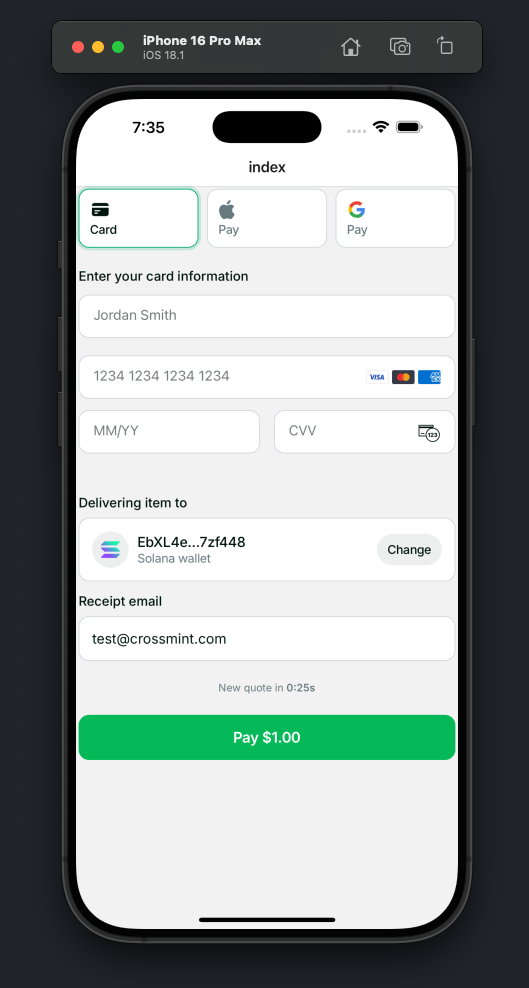
Result